
Power to the Players: Designing Video Game UI for Low Vision Players
Jun 29, 2023
Project Scope: 3 Months
Project Type: Capstone Project
Role: UX Research, UI Design, Usability Testing, Product Design
Tools: Figma, Miro, Paper, Pencil
Methods: Need-Finding Interviews, Customer Journey Map, Personas, Community Brainstorming, and Usability Testing
Team Members: Emmy Thompson, Edith Zhang, Stephanie Tong, and Elizabeth Riddle
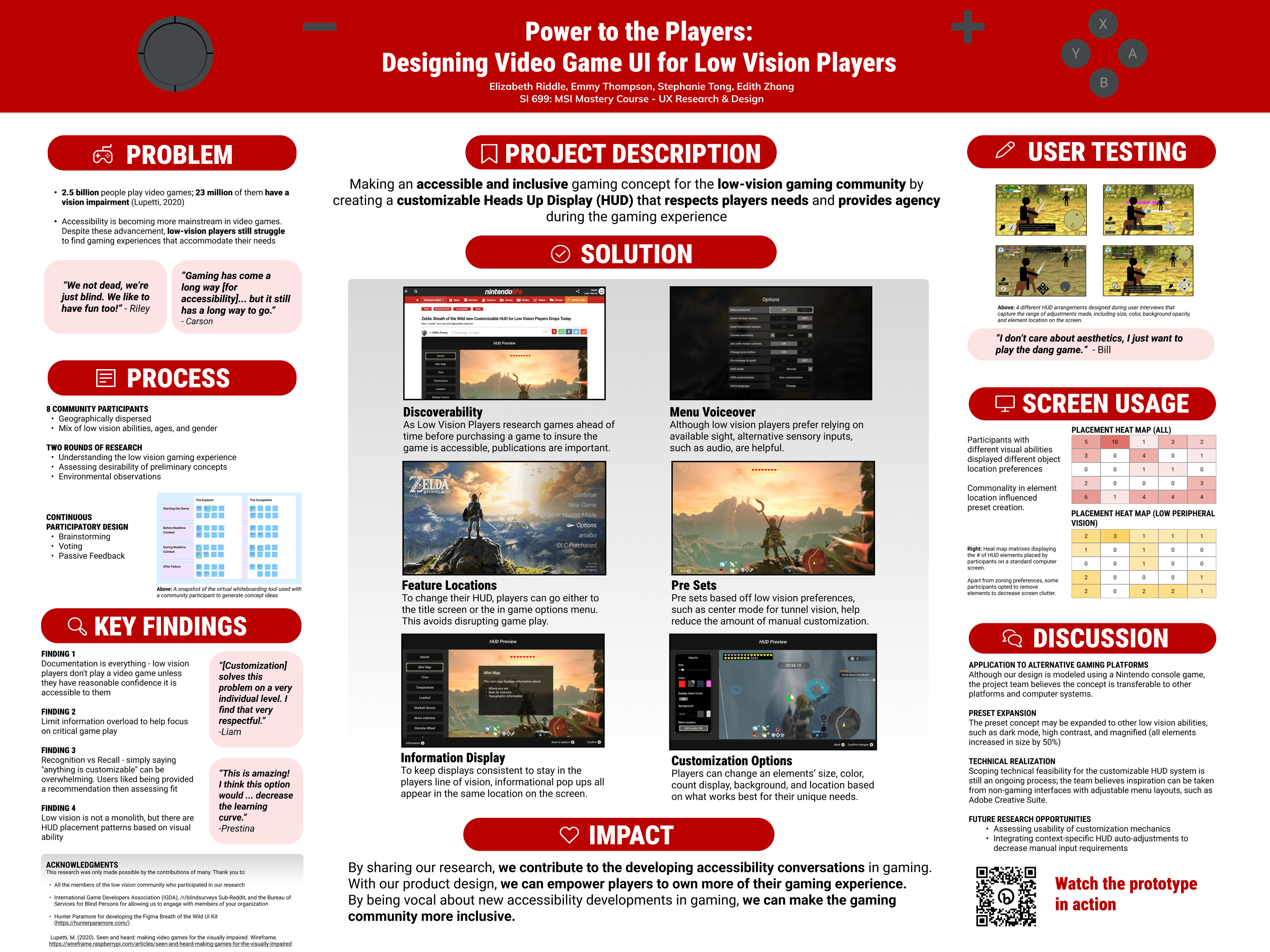
UMSI Expo Poster showcasing our projects research and design solution.
This project was awarded First Place for the Residential Master's Programs Final Projects award at the UMSI Expo in 2023 against 25 other final project teams.
Project Summary
This project aimed to make an accessible and inclusive concept for the low-vision gaming community to address the primary problem statement: Interpreting game information is a barrier to entry to enjoying and playing video games. To do this, we created a customizable Heads Up Display (HUD) that allows players to change the size, location, color, and other aspects of a game's visual system. This respects players individual needs and empowers players by giving them agency over their own gaming experience.
Motivation and Impact
Around 2.5 billion people play video games worldwide; of those, nearly 23 million people who play video games have a visual impairment. Video game accessibility has been an increasingly important area for research in recent years, and has become mainstream with the release of popular video games like God of War: Ragnarok and The Last of Us: Part II. Audio-based video games, such as BlindSide, have also made it to the market, proving immersive video games can be made using only audio cues.
Despite these examples of accessibility excellence, low vision players say that the gaming industry is not doing enough, with many players having to resort to workarounds using adaptive technology or to improve color and contrast, enlarge game elements, and deliver information through auditory and haptic means. These workarounds are not guaranteed to be compatible with all video games, showing that accessibility solutions should ideally be implemented at the game title level.
"We are blind, not dead! We like having fun too!" -Riley
Additionally, video game genres are expansive, making the limited catalog of accessible video games restrictive to the gaming interests of all low vision players. Like sighted players, low vision players have different gaming styles, with some motivated by virtual world exploration, others by achieving technical mastery, and many prioritizing building community with others.
Our goal with this project is to create a design solution that any developer can integrate into their game to make them more accessible for low-vision across a variety of gaming styles.
Research Questions (RQs)
RQ1: What current strategies do people with low vision employ to navigate space, in real life + in video games
RQ1.1 What is the best balance between sound, verbal, and other sensory cues to support navigation?
RQ2: What areas of gameplay can be improved to improve learning curves using asset-based design for people with low vision?
RQ3: What game genres, platforms, and video game titles would these learning strategies be most valuable
RQ3.1 What games do video gamers with low vision gravitate toward (if any)?
Design Requirements (DRs)
Because our research found that there are current standards for visual accessible features in gaming (though they may not always be followed), our final design solution must meet the following minimum requirements for low vision accessibility: Font size adjustment, Zoom in capabilities, Object / Background contrast, Voice over, Dark mode, General color contrast controls.
Because our research found that low vision varies between players, our solution needs to be customizable to suit each individual's needs.
Because our research found that low vision players can only focus on a limited area of a screen at a time, our design will focus on ensuring important game information is within the player's field of vision.
Evaluation Analysis Process
Evaluation Methods + Measurements
Overview
x5 60-minute sessions hosted on Zoom. Participants spanned across the visual impairment spectrum and were diverse in age, gender, and location.
In Activity 2 and 3, participants were introduced to low-fidelity prototypes for a fictional PC or gaming computer video game, with an open world environment and real time actions and fighting.
Activity 1: Semi-structured interview -
Discuss gaming history, digital navigation techniques, and experience with gaming system visual layouts / HUDs
Activity 2: Visual elements walkthrough -
Assess two low-fidelity versions of an onboarding walkthrough experience and provide feedback and preference.
Activity 3: Ideal HUD Layout -
Through verbal dictation to the research team, the participant builds their ideal HUD layout. The prototype is modified in real time on Figma by two "wizards" in three stages:
HUD with static character and no background
HUD with character in battle scene and no background
HUD with character in battle scene with background
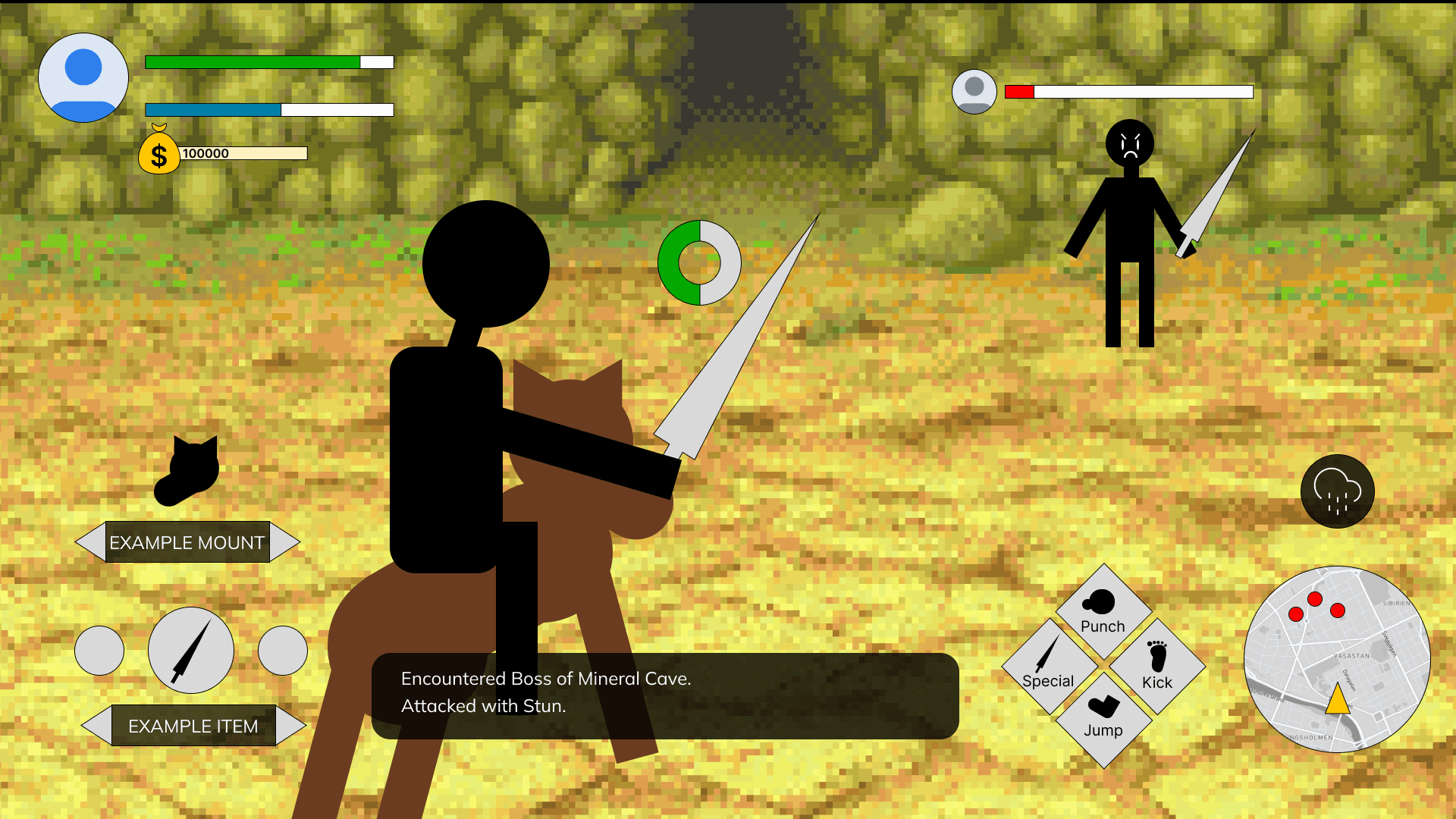
A scene from Activity 3 (Ideal HUD Layout). Participants were told that all HUD elements were able to be adjusted. Based on verbal dictation, the research team manipulated the HUD to best suit their visual needs.
Evaluation Key Findings (KFs)
A completely customizable HUD experience would allow people with a variety of visual impairments to experience their favorite video games. Overall, HUD customization was well received by users.
"This is amazing! I think this option would add time to the set up, but would decrease the learning curve." -Prestina
"It lets me put stuff where I know I can catch it and read it, if I can adjust elements like borders and stuff, that would be AMAZING." - Wilmen
"I actually really like that system. It's really intuitive and as someone who has spent 250 hours in Breath Of The Wild, that would be incredible to have." - Christian
"It's nice to be able to adjust things so you can play a game more comfortably instead of being forced into what they think is a good idea in general." - Janice
In addition to the overwhelmingly positive response to the concept, we found 4 key insights about the low-vision player experience that we ideated on with the community.
Documentation is everything - low vision players do not play a video game unless they have reasonable confidence that it is accessible to them.
Limit information overload to help focus on critical elements of gameplay.
Recognition vs Recall - simply saying "anything is customizable" can be overwhelming. Users liked being provided a recommendation then accessing fit rather than having a blank slate.
Low vision is not a monolith, though there are HUD placement patterns based on visual need.
Overall, users enjoyed the experience of customizing their HUDs, with all participants rating the experience a 5/5. These conclusions helped us make adjustments between our low and high fidelity prototypes.
Design Solution
Before feature release
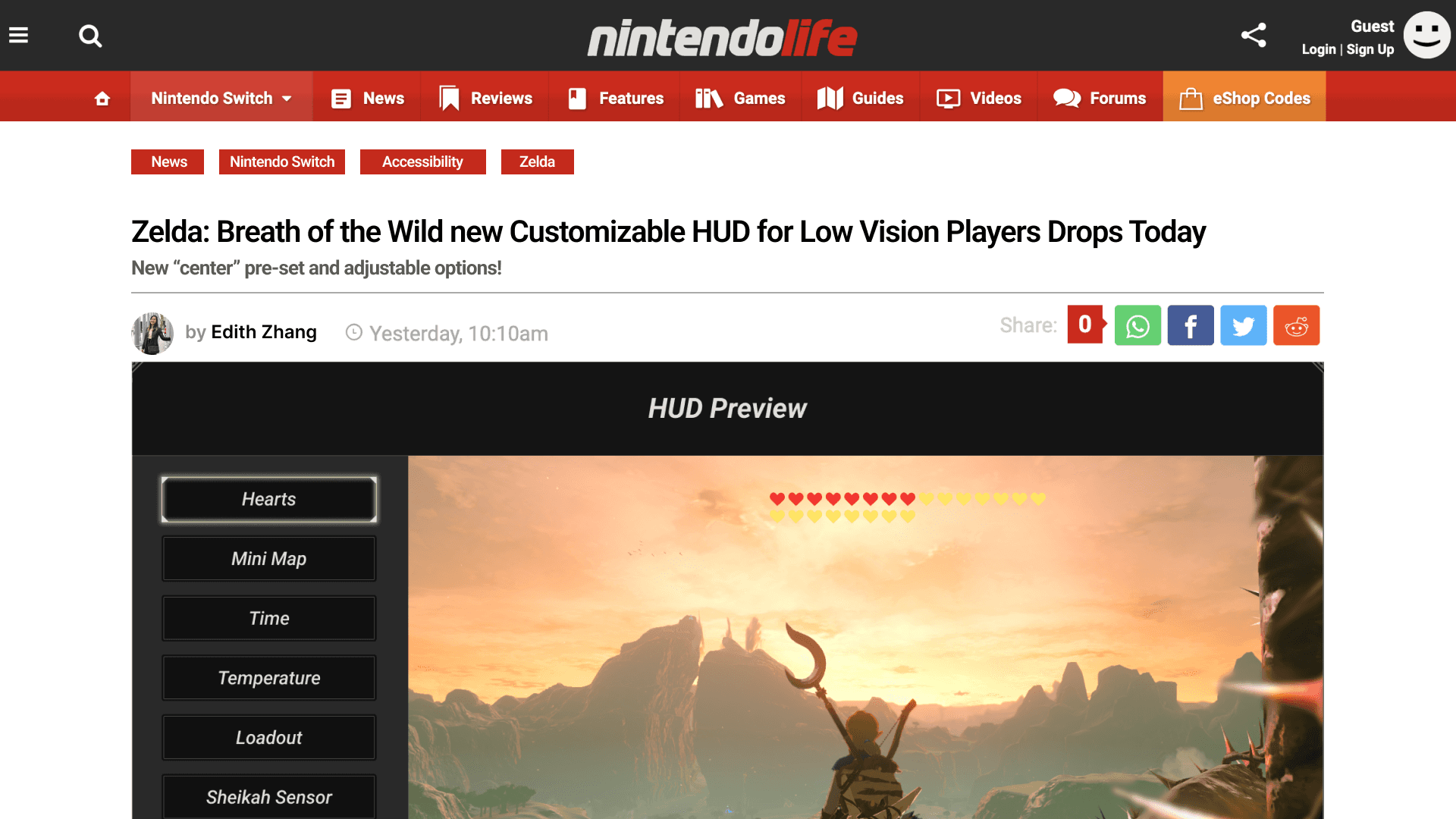
A mock-up of an article on Nintendo Life that showcases the design we created for a heads up display.
A part of the gaming experience, especially for low vision players, is looking up games ahead of time to determine what to play (KF1). To ensure that this feature is discoverable to the playerbase, we designed a mock article that shows the feature on Nintendo Life. If a feature that is accessible is launched, but it is not advertised, players may not discover it.
"[It's like] Braille signage in the airport - how would we know to look for that? How would we know to look for accessibility options in a game if no one suggests it to us?" - Liam
About the Game and System
See the features in action
Feature 1 - Menu Voiceover
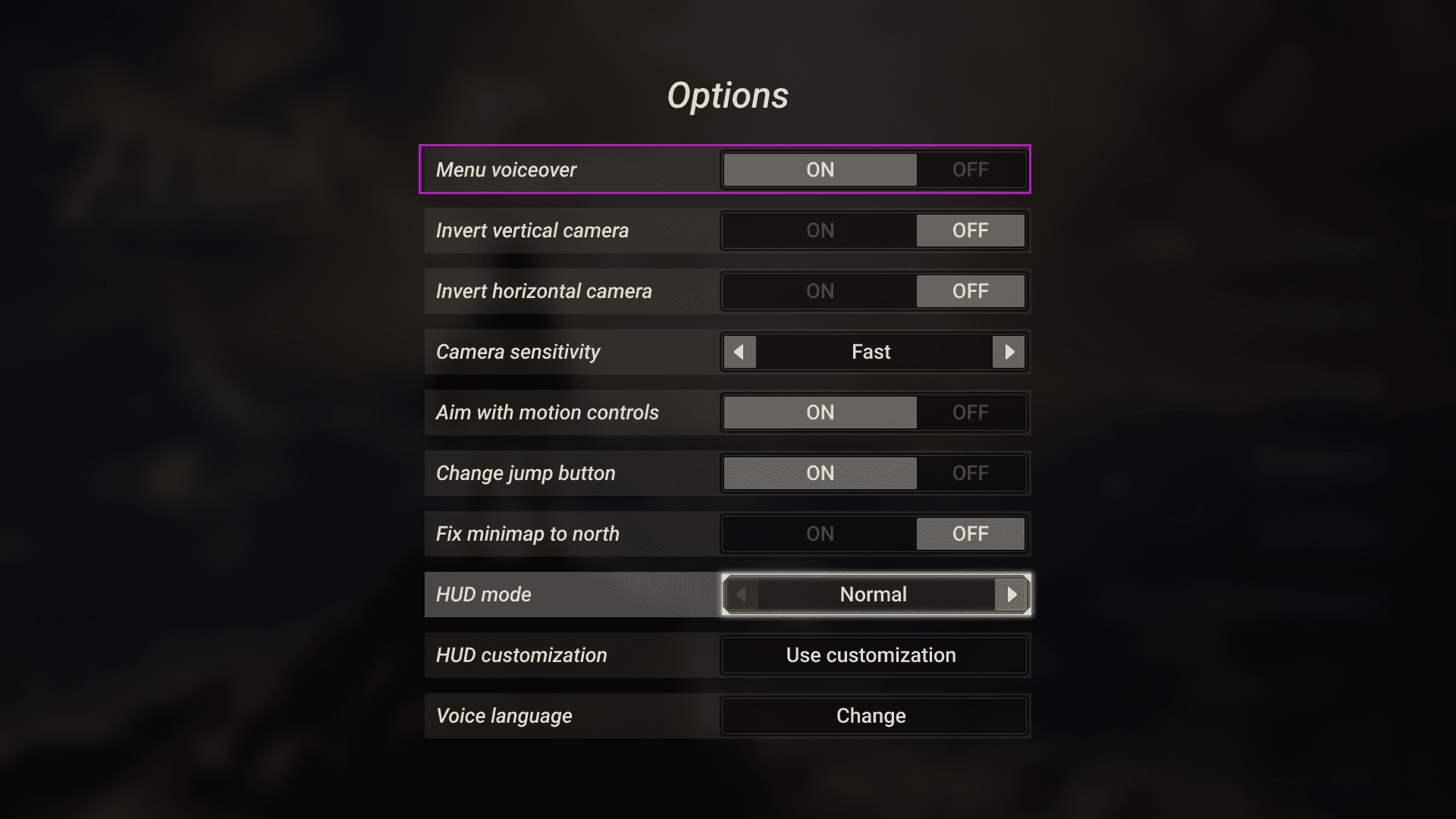
Players can toggle menu voiceover on and off in the options menu.
Many video games are not screen reader compatible and many players do not use screen readers due to their difficulty, robotic tone, and inability to read graphical objects (RQ1). However, players do find text to speech menu voiceover options to be helpful especially when games have smaller text that can be difficult to read.
"If tutorials are good at narrating what they're doing, they're the most helpful." -Prestina
"Text to audio does not work in most games. Text in games is not recognized as text since it's a graphic object." - Liam
In our options menu, we included a toggle to turn on a menu voiceover feature. This feature reads outloud headers and body text. By allowing players the option to manually turn this feature on and off, players are able to include an additional auditory feature if there is need.
Feature 2 - HUD Customization Locations
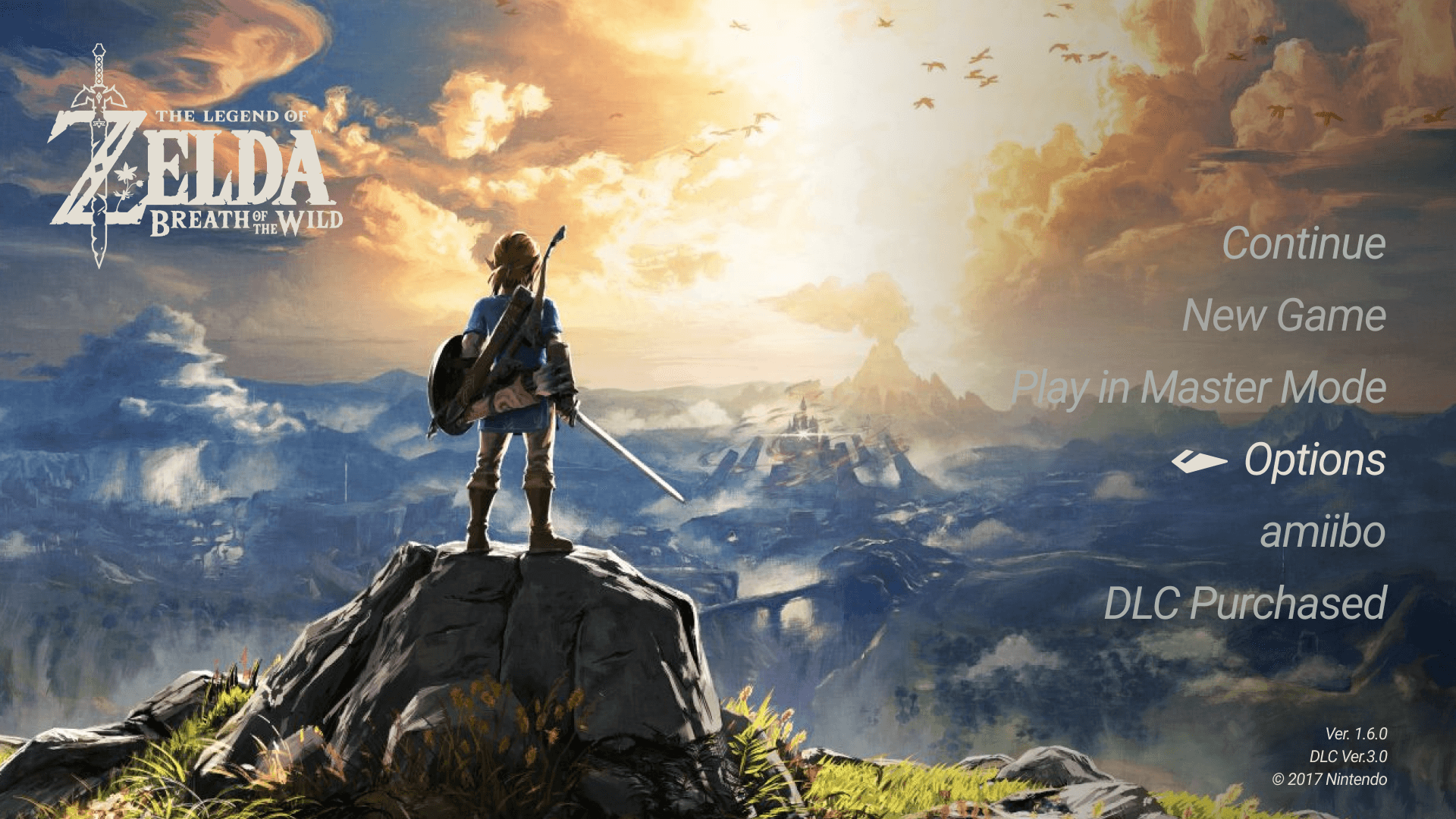
Players can access the options menu from the main home screen.
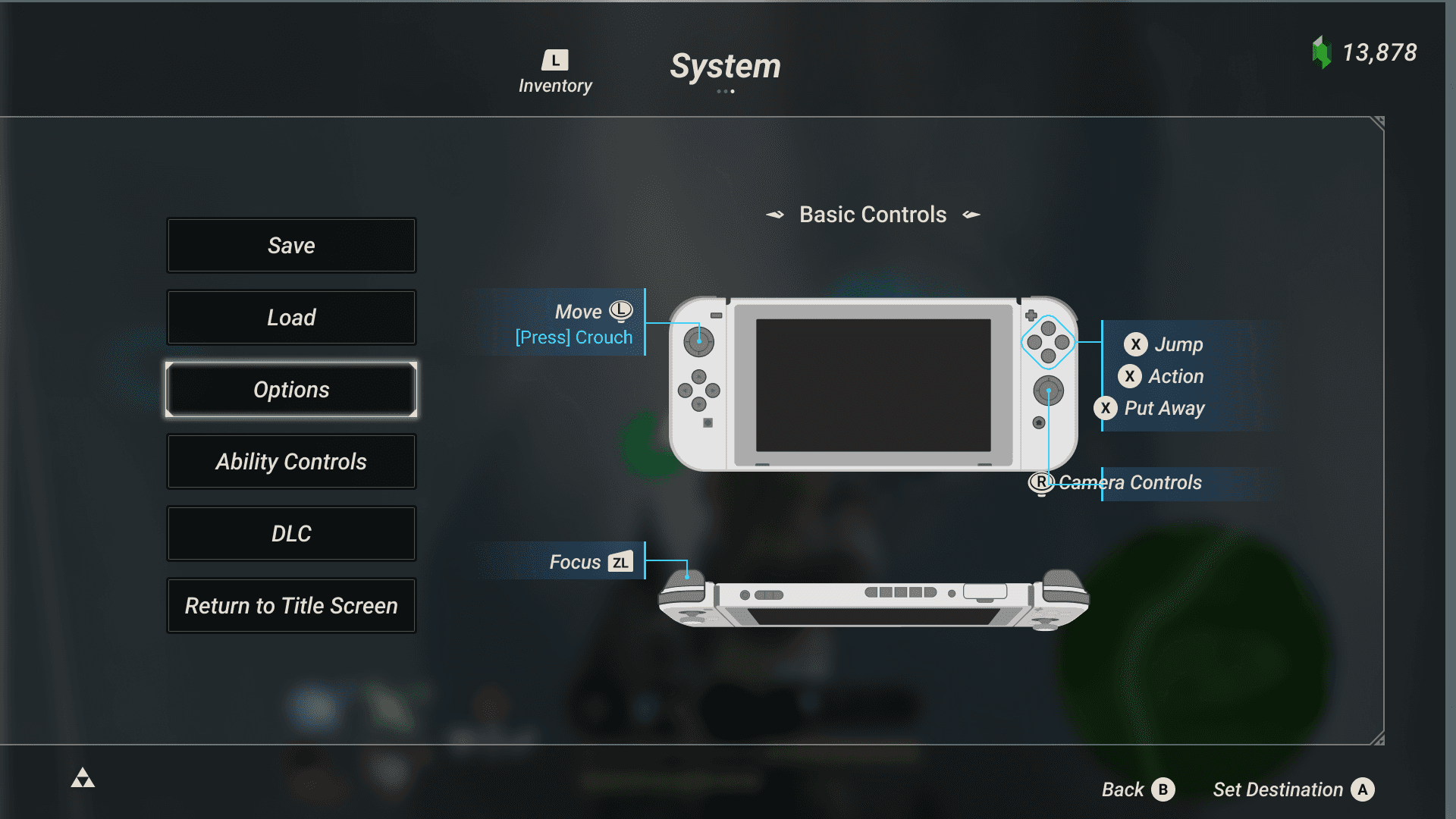
Players can access the options menu during gameplay.
Throughout gameplay, players may need to change their HUD depending on changing dynamics of the game such as the background, a certain enemy type, etc. In our user testing, 5 out of 5 participants changed their HUD layouts after a background was added. Being able to change the HUD throughout gameplay allows players to have contextual HUDs (typically open world games can take upwards to 60+ hours to complete) and truly adjust as much as needed. Therefore, players can access the options to change their HUD from the home screen (the beginning of the game) and anytime live in their gameplay settings. Changing the HUD at Game Start helps establish an early structure, whereas accessing it through the in-game System menu prevents interruption to gameplay flow.
Feature 3 - Presets
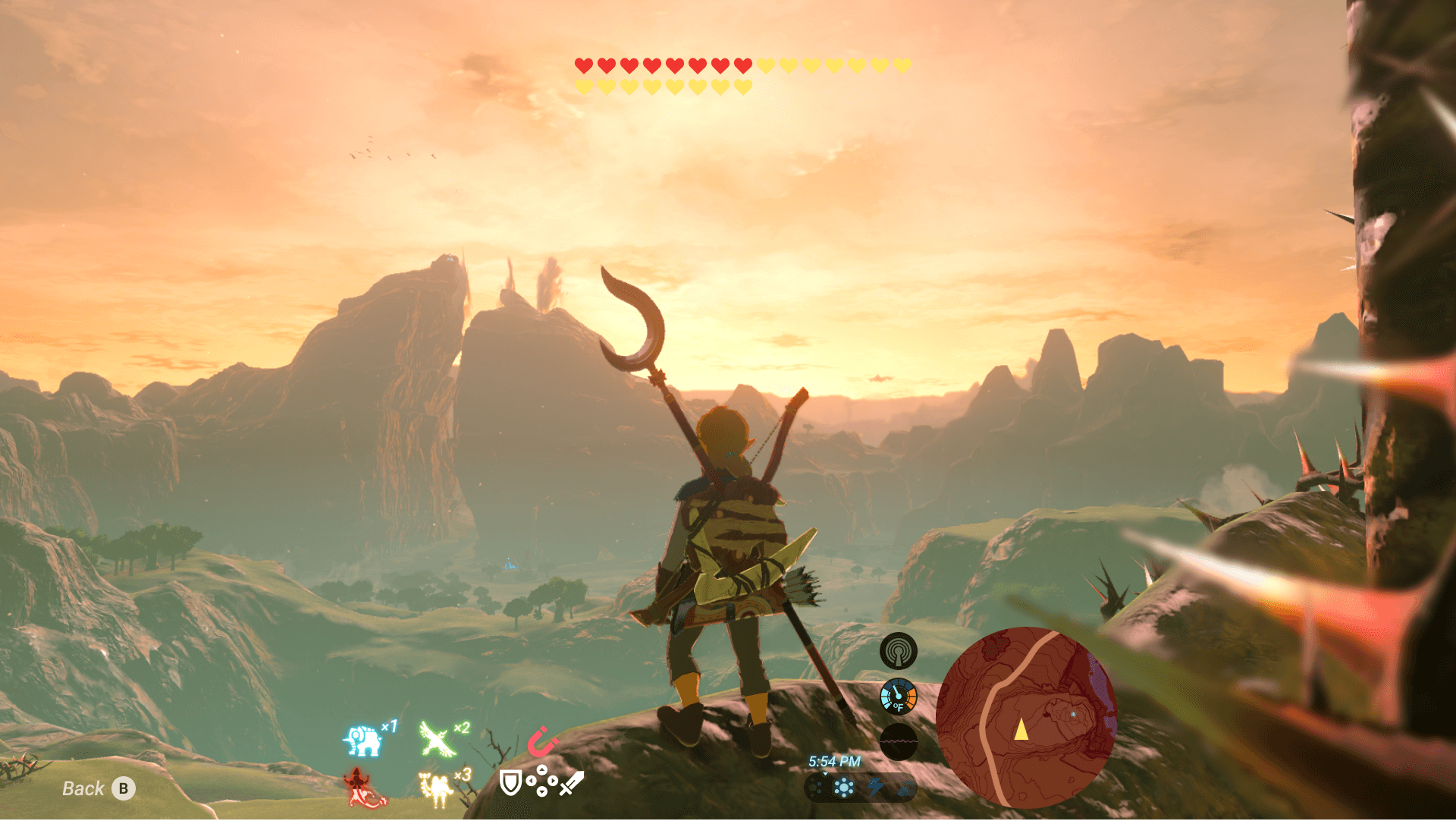
HUD Mode center moves all HUD elements to the bottom center of the screen.
In the options menu, players can toggle between HUD Modes. HUD Modes are saved HUD arrangement presets. Breath of the Wild currently has this feature and has two options: Normal (traditional HUD) and Pro (removes all HUD elements except for health). In our prototype, we have added an additional HUD Mode preset called Center. Center moves all HUD elements to the bottom center of the screen. This preset is designed to ensure important elements are in the players field of vision for players with low peripheral vision (KF4).
"It's more natural [center] because my eyes rapidly shake. I don't have total control over my eyes, I'm trying to look up right now, but my eyes are struggling right now." - Christian
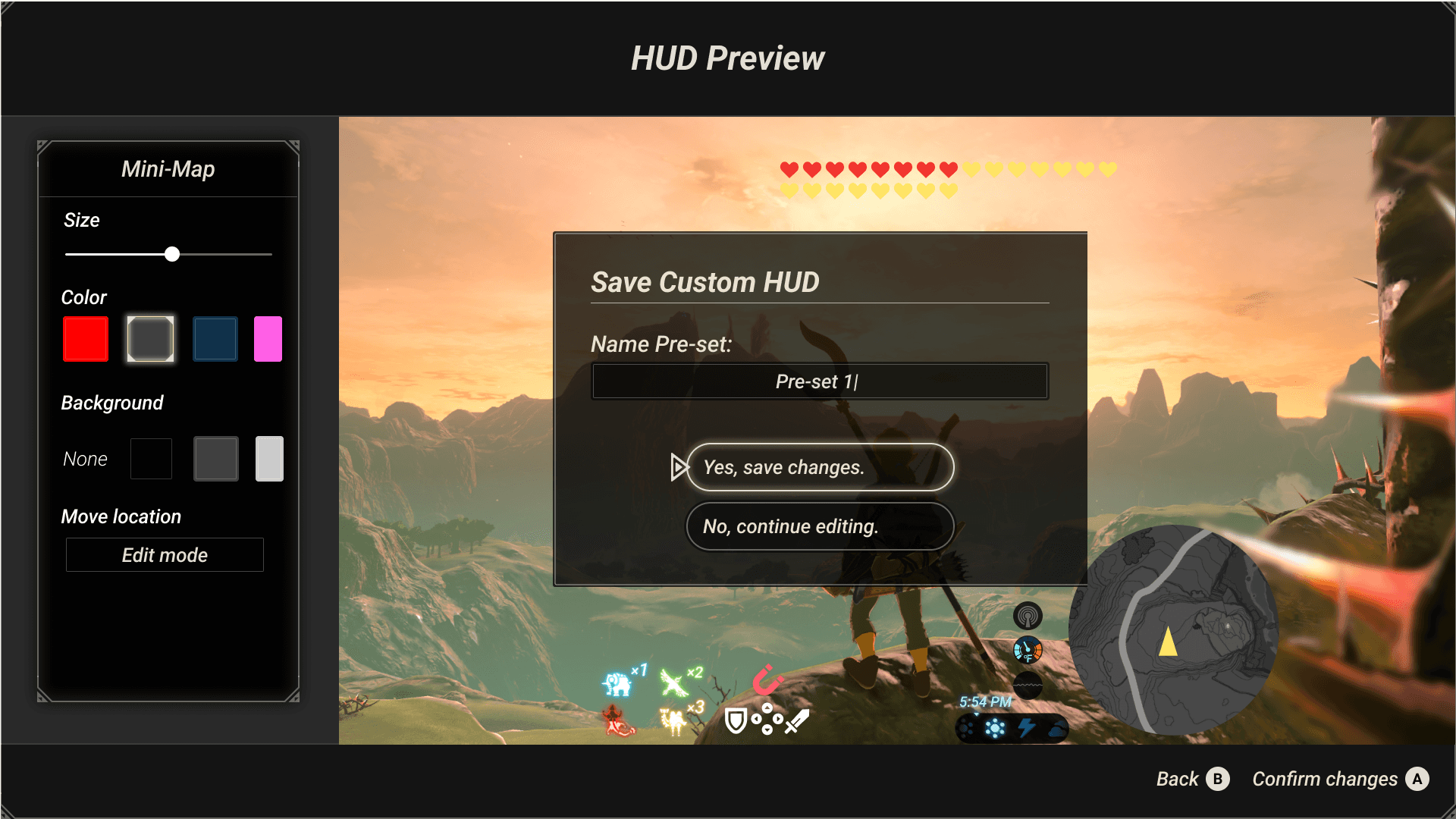
Save Custom HUD preset name screen.
Additionally, players can save their own customized presets to this toggle. This allows players to switch between versions of the HUD that work best for them depending on the quick, changing gameplay.
Feature 4 - Simplified HUDs
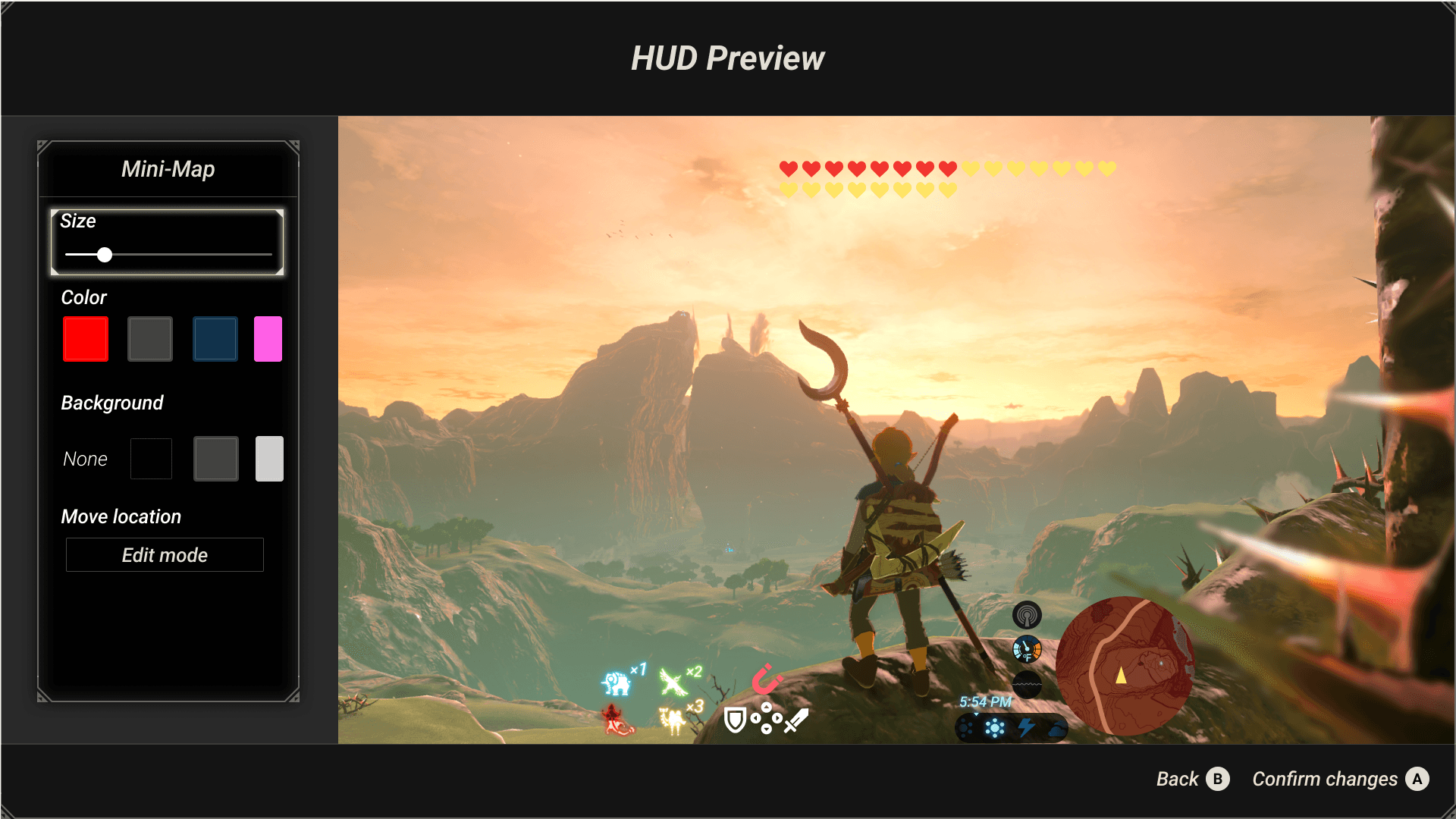
HUD Customization screen - default element size is at around 15% of maximum adjustable size.
Games that have multiple HUD elements can be overwhelming especially for players who may not be able to scan a full screen at once or have high saccadic eye movements. In order to allow players to simplify their HUDs, all elements can be removed from the HUD by changing the size to 0% (the default is 15%) (KF3).
"[a crowded screen] is an information overload for my eyes" - Janice
Additionally, longer descriptions for an elements' information are automatically hidden so players' screens are not crowded. For example, if a player wanted to know more about the mini map element, they could press Y to learn more. These descriptions are broken up as well to align with best UX practices such as chunking.
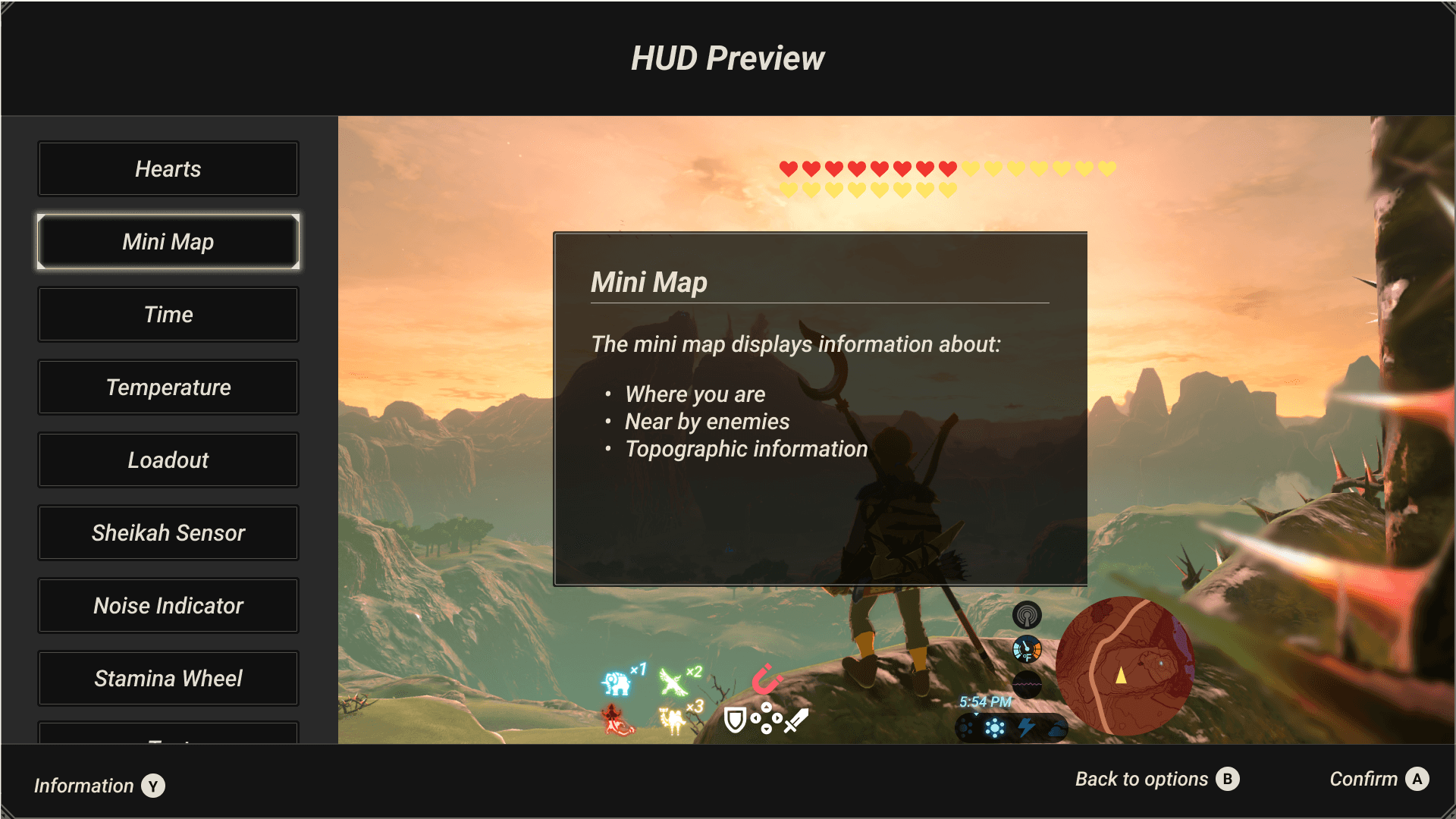
Mini Map additional information pop up describes the purpose of the element.
Feature 5 - Customization Options
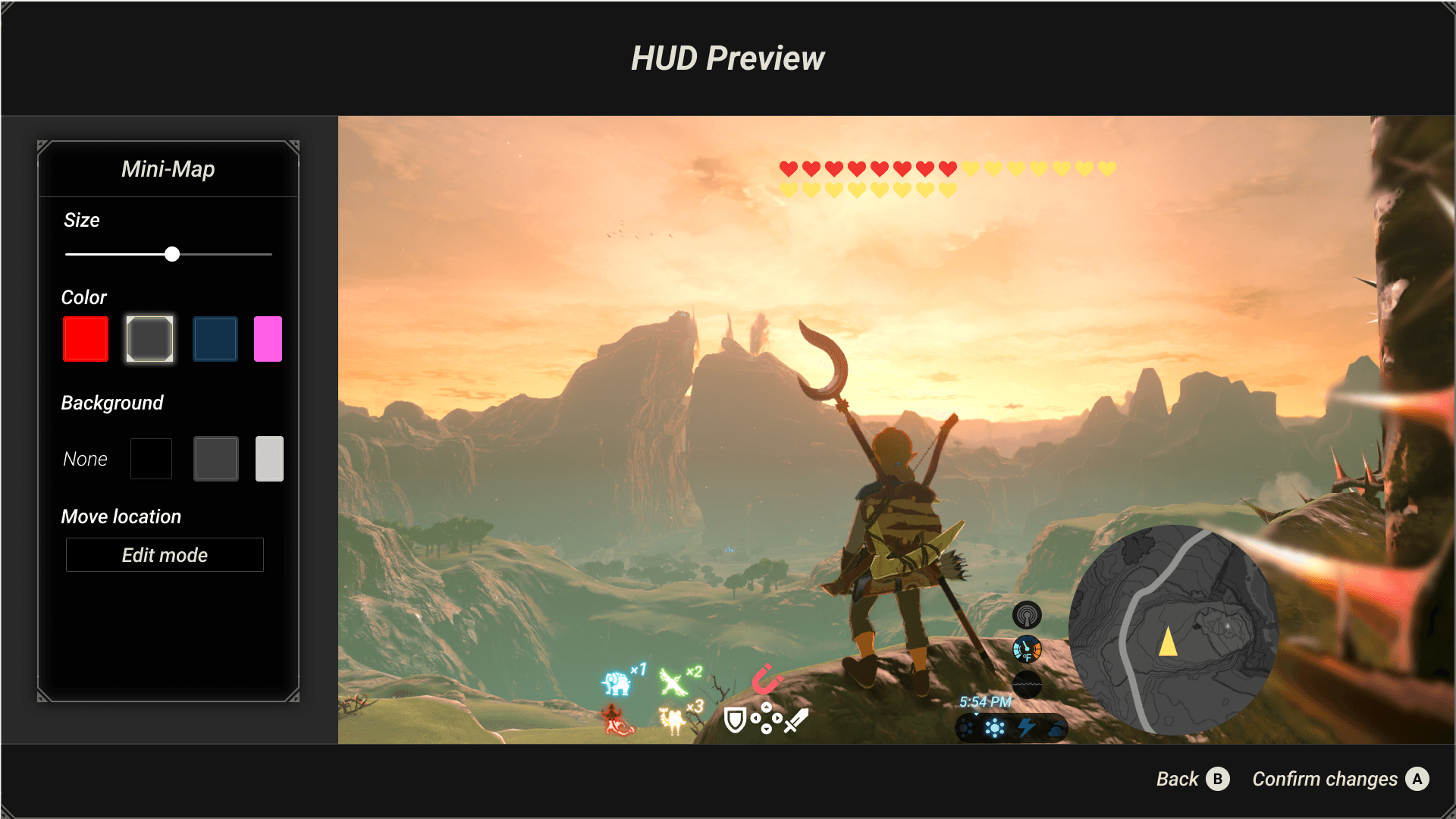
HUD Customization for an elements' size, color, counts, background, and location.
Based on our low fidelity user testing, we identified 5 key types of changes that players typically changed on elements: size, color, counts (adding or removing additional textual/numerical information), background, and location. We included these change options in the final HUD customization screen. In this screen, each type of change gives players options (ie select colors instead of a large color wheel selector). Based on Hick's Law, we noted that players found it easier to make changes that helped them after being prompted with a few options.
Immediate Next Steps
Our first next step is showing our research to members of the game community, which we have already begun. Our team attended an Ann Arbor Game Developers meetup and received feedback from local developers that our idea is feasible to implement in a game, either in a patch after launch or prior to launch. We will also be sharing our work in the International Game Developers Association Discord where we have previously gotten feedback on our work. We will also be sharing the final project with our interview participants, one of whom wants to discuss the work on their YouTube gaming channel.
Though our fully realized vision is a customizable HUD, in the short term we will target wider spread adoption of a center-mode HUD preset. We spoke with Austin Yaeger, the game development lecturer at the University of Michigan, who validated that this would be a lower lift to develop than the whole system. Some games, such as Monster Hunter or Breath of the Wild, already have Presets, but they only remove items rather than relocate them. This would also make it more realistic as a patch or a mod. Though the center mode preset is not sufficient for all types of low vision, it does help those with tunnel vision or rapid eye movements.
Acknowledgements
This research was only made possible by the contributions of many. Thank you to:
All the members of the low vision community who participated in our research
International Game Developers Association (IGDA), /r/blindsurveys Sub-Reddit, and the Bureau of Services for Blind Persons for allowing us to engage with members of your organization
Hunter Paramore for developing the Figma Breath of the Wild UI Kit
Want to Talk?
Me too! Reach out to me about professional roles or just sharing your favorite anime (mine is Detective Conan):